Virtual run – 31 August to 6 September – find out more
From 31 August to 6 September, runners from Poland and around the world will be completing the virtual route of the Poland Business Run 2026. If you’re taking part in one of the following packages: Virtual, Virtual Plus, Virtual Eco or Virtual Charity, we’ve put together the key information you need to know about taking part in the run.
Where and with whom can I take part?
As participants in the virtual run, you can cover 4 km anywhere – in Poland or on the other side of the world. You can run on your own, choosing your favourite route, or get together with a team and cover the distance together at the same time. The most important thing is that you’re running for one special cause.
How can you complete the virtual distance?
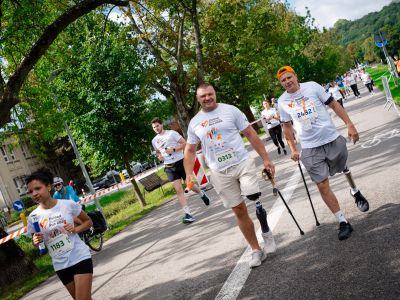
You can complete the virtual run route in whatever way suits you best – by running or walking, with a stroller, using Nordic walking poles, with a guide or with your four-legged friend. You can also complete the distance on a treadmill.
However, during the run, you must not use bicycles, roller skates, skateboards, skis, scooters or any other equipment or vehicles designed for getting around.
In what order should my team run?
The virtual run gives you a great deal of flexibility – you don’t have to start together or at the same time. Each team member can choose a day, place and time that suits them to complete their distance, between 31 August and 6 September.
However, on the results list, participants will appear in the order specified by the teams in the Registration Form by 27 August.
When will the results of the 2026 virtual PBR be announced?
We will publish the official results of the virtual race on the Poland Business Run website within two weeks of it finishing.
By when do I need to submit my result?
You can complete the virtual run at any time between 31 August and 6 September.
This means that by 6 September at 23:59, every participant should have completed their distance and submitted their result via the app or the website.
For a team to be included in the rankings, all its members must complete the run and submit their results by the deadline.
What if I submit the wrong result?
Once you’ve completed the 4 km and submitted your result, you’ll receive an email confirming that you’ve finished the run. In this email, we’ll also include a link that you can use if you’ve made a mistake when submitting your result.
Simply click on the link to delete the result and upload it again.
What should I do if I’m facing a problem?
If you encounter any technical issues whilst entering a result or recording a run, please use the ‘report a problem’ option in the app or send an email to [email protected].
Where can I download the Poland Business Run app?
You can download the Poland Business Run app from the App Store or Google Play. It is free to download and use.
Does every virtual runner have to download the Poland Business Run app?
You don’t have to use the PBR app to register your result. You can do this using any sports app, a sports watch or on a treadmill, and then add your result via the pbr.pl website.
However, it’s worth choosing the PBR app – not only will it let you record your run, but you can also track your route and your result in real time. It’s the most convenient way to keep track of your entire run and soak up the atmosphere of the Poland Business Run, even if you’re running away from the main route.
Three ways to register for a virtual run:
1. Track your run in real time via the PBR app
The first way is to track your run in real time via the Poland Business Run app. You don’t need to create an account or log in to the app.
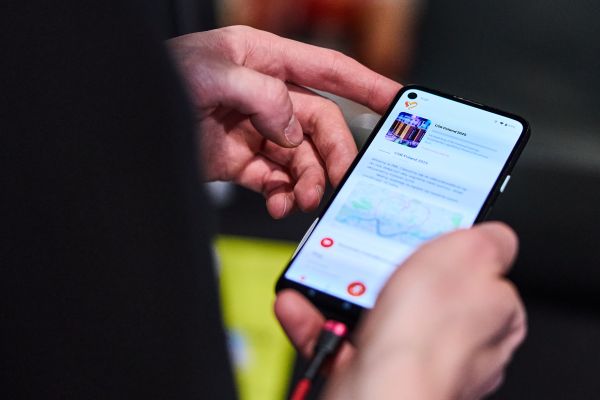
Download the Poland Business Run app. Once you’ve opened the app, you’ll see information about the run and a red ‘Take part’ button. Tap it.
Once you’ve tapped the button, you’ll be taken to a page with information about the run, featuring an orange ‘Start the virtual run’ button at the bottom of the page. To start tracking your run, tap this button.
You’ll then see your location on the map and an orange ‘Start PBR run’ button. Tap the button to begin the virtual race.
The screen will display your location, the duration of your activity and the distance covered. You can lock your smartphone screen – the run will continue to be recorded in the background. The timer will stop automatically once you’ve covered a distance of 4 km.
You will then see the message “You did it Poland Business Run 2026 completed!” along with a summary of your performance, i.e. your time and the distance covered. To save your run, enter your email address (it must be the same one you provided when registering) and press the orange “Save” button.
- If you wish to repeat the run, press the “Discard” button before saving your result.
- If you click the orange “End PBR run” button before completing the 4 km distance, you’ll see a message stating that your result will not be saved. You can choose to continue the run or end the attempt and try to complete the distance again before 6 September at 23:59. Please note – you cannot pause the run and return to it later.
- If you encounter technical problems whilst recording your run, press the “report a fault” button. This button will take you to a fault reporting form where you can describe your problem.
Please note – the option to start the virtual run will only become available on 31 August and will remain available until 6 September at 23:59.
2. Tracking your run using another app, a sports watch or a treadmill + saving your result via the PBR app
The second method is to record your result using any sports app, sports watch or treadmill and enter it into the Poland Business Run app. You don’t need to create an account or log in to the app.
How do you do it? Record your 4-kilometre run using any app, smartwatch or stationary treadmill of your choice. Then take a screenshot or photo confirming your result. The photo should show the time and distance.
When you open the app, you’ll see details of the run and a red 'Take part’ button. Tap it.
When you press the button, you’ll be taken to a page with information about the run, which also features a white ‘Add the result of the virtual race’ button at the bottom of the page. Click this button.
You will then see the message “You did it! Poland Business Run 2026 completed!”. Click on the orange button with the plus sign “Add your time” and enter your result manually. Next, enter your email address (it must be the same one you provided when registering) and upload a screenshot confirming your result. The file size must not exceed 2MB. To complete the process, click the orange ‘Submit result’ button.
If you encounter any technical issues whilst registering your run, click the “Report a bug” button. This button will take you to the bug report form, where you can describe your problem.
Please note – the option to register for the virtual run will only become available on 31 August and will remain open until 6 September at 23:59.
3. Track your run using another app, a sports watch or on a treadmill, and save your results via the website www.pbr.pl
The third way is to record your result using any sports app and submit it via the Poland Business Run website.
How do you do this? Record your 4-kilometre run using any app, smartwatch or treadmill of your choice. Then take a screenshot or photo confirming your result. The photo should clearly show your time and distance.
Next, go to pbr.pl and click the ‘Add result’ button on the homepage. Manually enter your time, upload the screenshot or photo confirming your result, and provide your email address (it must be the same one used when you registered). Then save your virtual run.
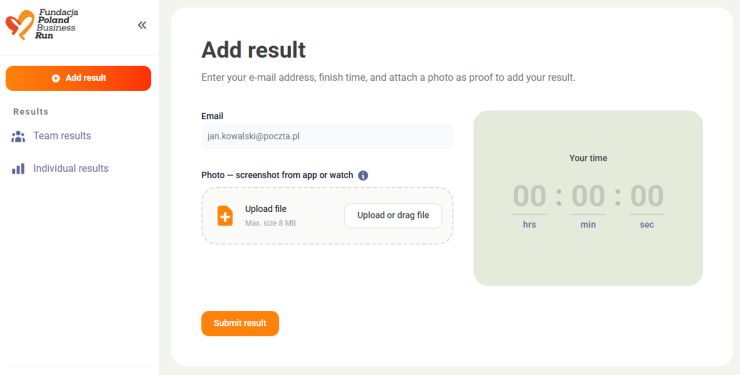
Please note – the option to add a result via the website will only become available on 31 August and will remain open until 6 September at 23:59.
.